 Hermes Agent
Forecasts your balance to payday
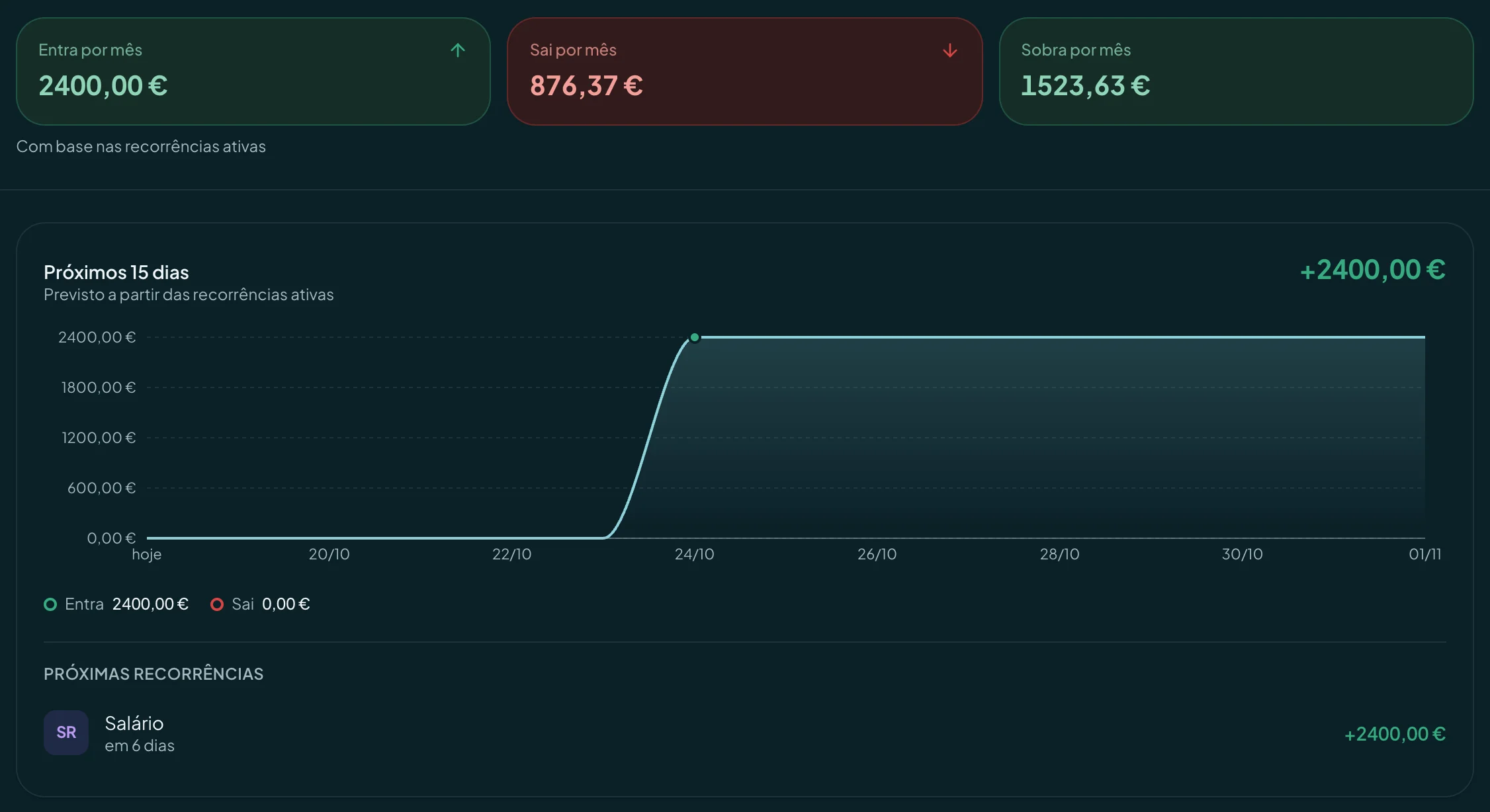
Day by day, with recurring and planned transactions. The lowest day of the month is marked.
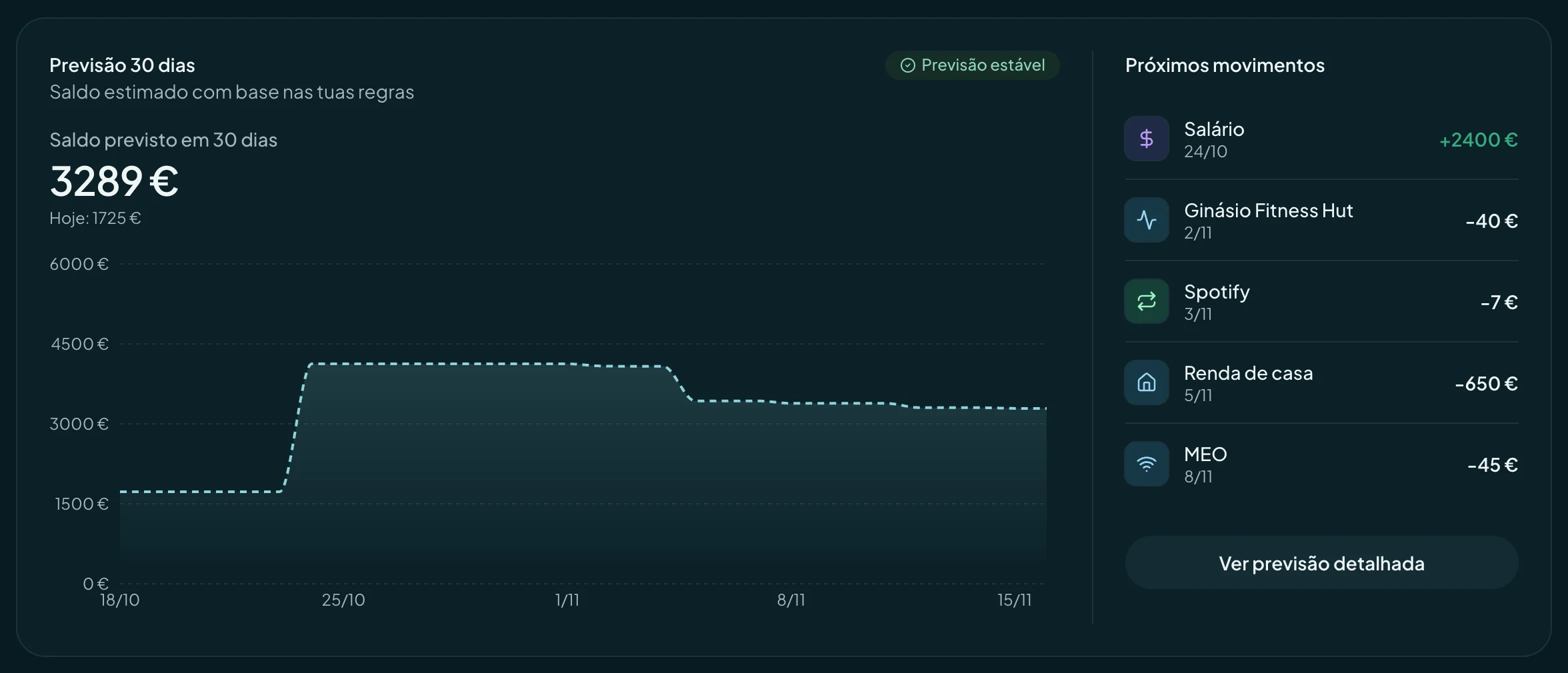
finko forecasts your balance for every day until payday and gives that forecast to your AI agent. Try it: change the expense and watch the month change shape.
The front line is finko’s forecast. The ones behind are the months that could have been, with the uncertainty growing towards the end of the month.
Works with your agent
The same forecast your agent sees, in an app for your phone. Open it and you know how the month ends.
Install without an app store
On iPhone or Android, add finko to your home screen from the browser. It opens like an app, in seconds.
The month at a glance
What you’ll have at the end of the month, your lowest day and what’s coming, on the first screen.
A warning before the lowest day
A notification when the forecast drops below the minimum you chose, in time to change something.
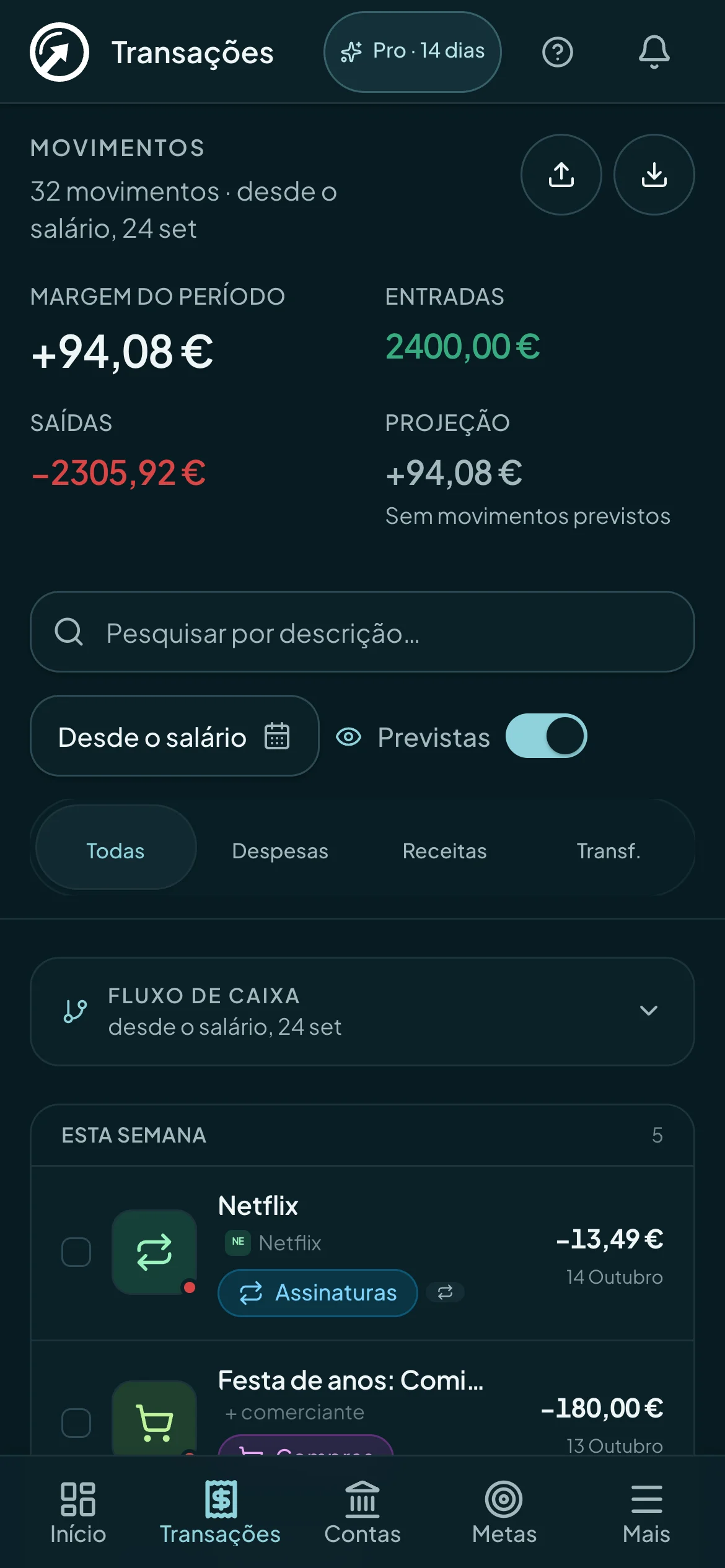
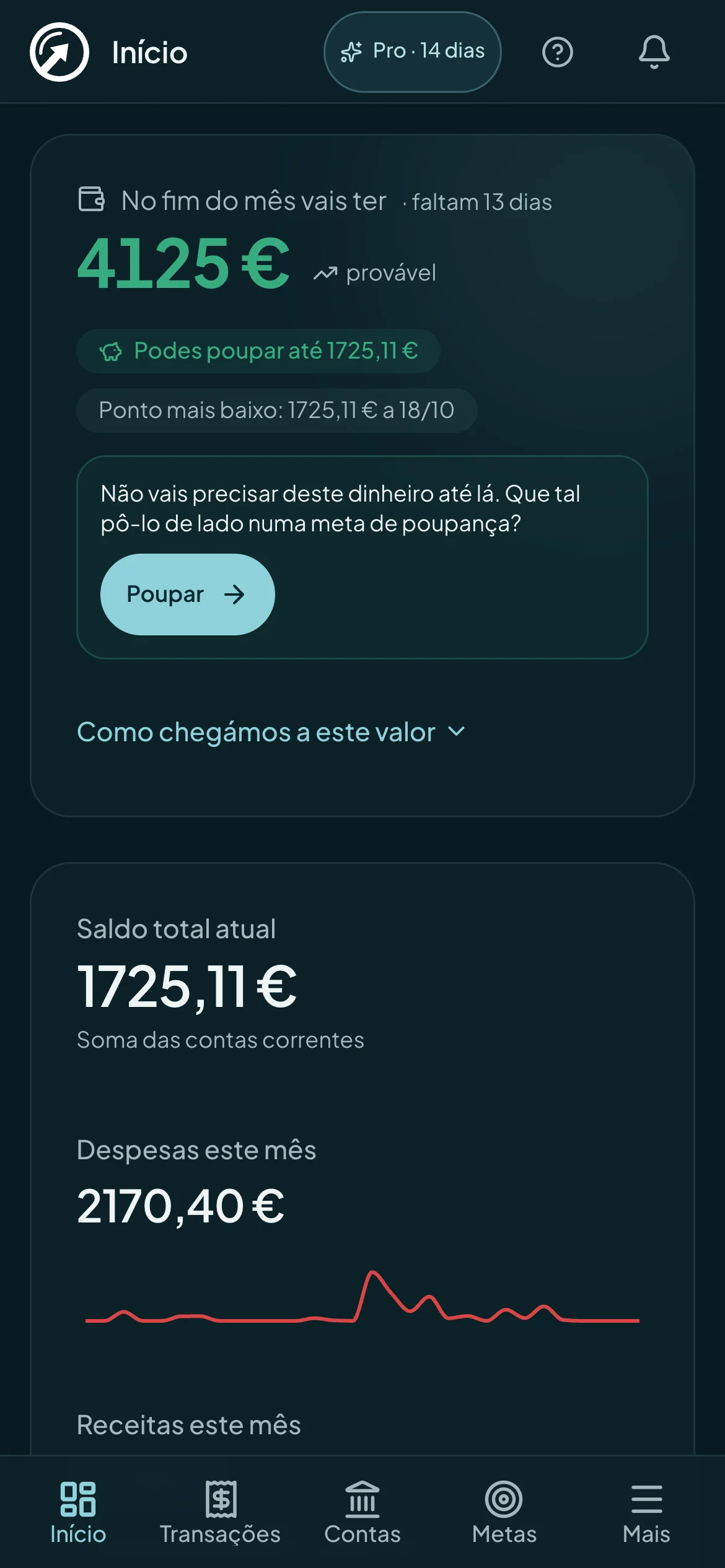
This is how it looks in Claude or ChatGPT with finko connected. Type an amount and a day, or pick a suggestion.
Your agents connect to finko over MCP and ask it about your month. finko forecasts from your transactions: they come in from statements or, in Portugal, straight from your bank.
Forecast engine
Your balance, day by day, to payday
Claude“How much will I have until my next payday?”
How to connect ClaudeOr import PDF or CSV statements
Your banksPro plan
Direct bank connection is available in Portugal, through open banking (PSD2), read-only. It is coming to more European countries.
Connect a bank in PortugalYou authorise once at your bank and finko starts receiving your transactions, balances and accounts. The forecast stays current, with no statements to import. Available in Portugal for now, and coming to more European countries.
finko cannot move money or make payments, and it never sees your bank credentials.
When you connect, up to 12 months of transactions come in, and finko spots your salary and fixed expenses straight away.
The connection is made by GoCardless, authorised under the European PSD2 directive. Consent lasts up to 180 days and you renew it with one tap.
Banks you can connect in Portugal
 Caixa Geral de Depósitos
 Millennium bcp
 Santander
 Novo Banco
 BPI
 Crédito Agrícola
 ActivoBank
 Banco Montepio
 Bankinter
 ABANCA
 Banco BiG
 Revolut
 N26
On Pro, up to 5 banks are included. Each extra bank costs €1.49 a month.
Twelve read tools, and writes only with your permission. The numbers are the same ones you see in the app.
Day by day, with recurring and planned transactions. The lowest day of the month is marked.
Rent, insurance and subscriptions: the next 15 days from your active recurring payments.
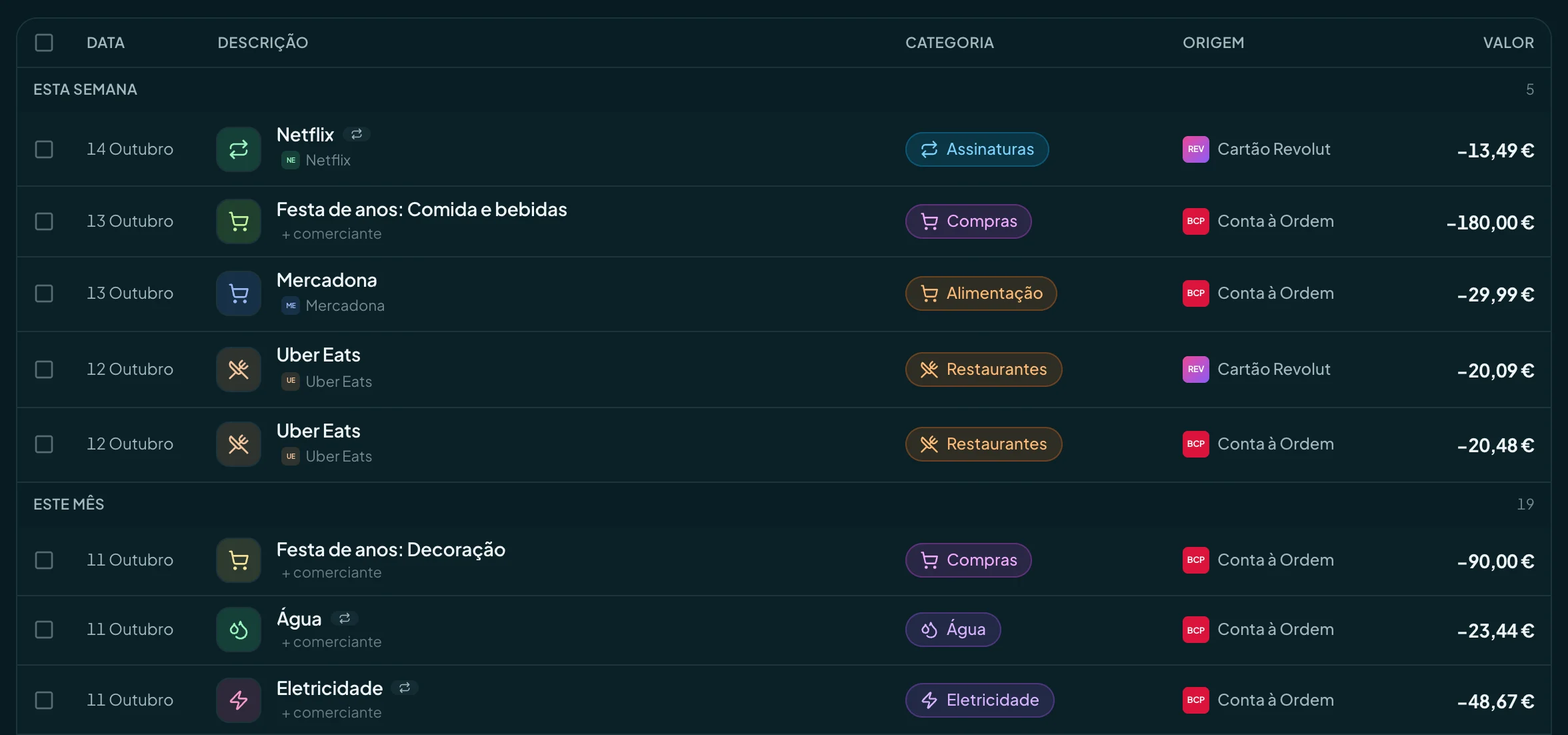
By merchant, category or amount, with the cash flow since your last payday.
12read tools
€0moved by the agent
2 minto connect your agent
How much of each project is paid and how much is left.

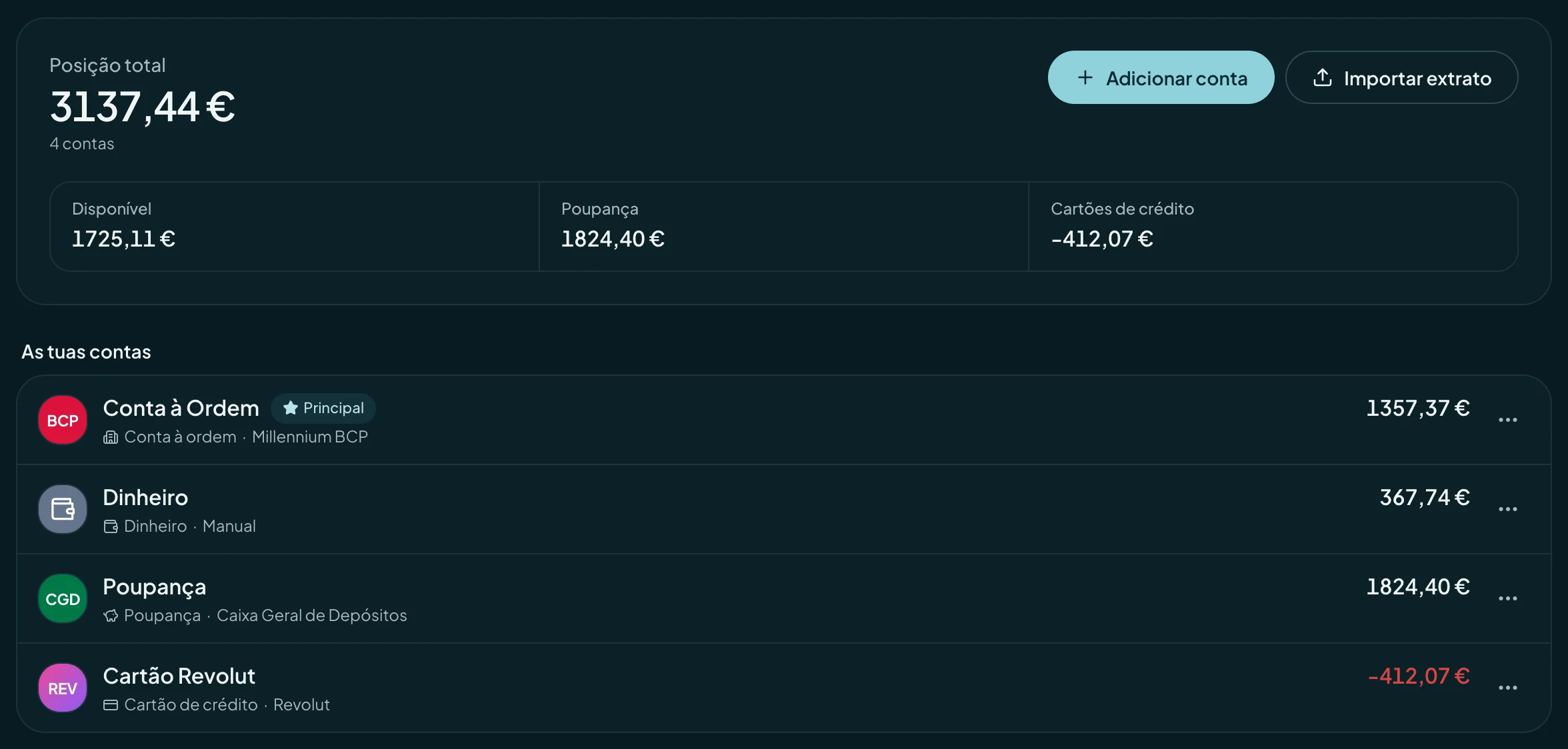
The balance at each bank, in one forecast.
Two minutes
First, you paste finko’s address into your agent and allow access.
Five minutes
Then you import your bank statement as a PDF or CSV.
Every day
From then on, finko redoes the forecast whenever something comes in.
MCP server address
https://The agent sees what finko’s tools send back, and nothing else. You decide the rest.
finko doesn’t make payments or transfers, and neither does the agent. It doesn’t touch your bank accounts.
The connection uses OAuth: you sign in to finko as usual and authorise the agent. It never sees your password.
Read only, or read and write. With write access, the agent does what you do in the app: categorises, plans, creates budgets and goals, adjusts recurring rules. It never moves money.
In Settings, AI agents, you see which agents are connected and cut any of them off in one click. Access ends right then.
Connect your Claude or ChatGPT on any plan, the free one too.
€0
forever
€6.99
a month, or €4.99 a month, billed yearly (€59.90 a year)
Each bank beyond the 5 costs €1.49 a month. To connect a bank during the trial, you add a card; you only pay when it ends.
The first 100 Pro customers keep €59.90 a year for good, even if the price goes up.
No tax number. No phone number. No card to try it, except to connect a bank. Cancel whenever you like.
Any client that speaks MCP (Model Context Protocol). Claude and ChatGPT connect with finko’s address and a sign-in, no keys needed. Claude Code and Cursor work too. If your client doesn’t support signing in, you use an API key.
Your own agent connects to finko over MCP and runs on your account with Claude, ChatGPT or whichever client you use, on whatever plan that service asks for. finko charges nothing extra for it: MCP works on every plan, Free too, within your plan’s limits.
No. Nothing the agent does moves money. By default it only reads. If you turn on write access, it can create, change and delete what you manage in finko, such as transactions, budgets and goals, and you have to grant that permission on the authorisation screen.
The agent receives the answers from the tools it calls, inside your account with that service, and nothing else: it has no access to your database. That service’s privacy policy applies. You can revoke the connection at any time in settings.
The app does it all: the forecast, goals, budgets and alerts are all there, with the same numbers the agent sees. Kompanion, the assistant that lives in the app and runs on finko’s AI, is part of Pro, and you can try it for 14 days with no card. The agent is optional.
You import your bank statement as a PDF or CSV, or add transactions by hand. Imports have a review step before anything is saved: nothing goes in without you seeing it. In Portugal, on Pro, you can also connect your bank directly. It’s coming to more European countries.
Yes. To connect your bank during the 14 days, you add a card, but you only pay when the trial ends. If you cancel before then, you pay nothing.
In the European Union, under the GDPR, encrypted in transit and at rest. The exception is AI requests (merchant categorisation and the assistant), which are processed by Anthropic in the United States under standard contractual clauses and never used to train models.
No. We don’t sell or share your data. The business model is the Pro subscription: you’re the customer, not the product. You can delete your account and all your data whenever you like, from settings.
Connect your agent to finko in two minutes. Free, no card.